Klede Plus
- 4.7
- Rating
- 100.00K
- Installs
- Free
- Price

 Analysis by App-foxy
I like apps that solve a small problem without trying to become my entire digital life. Klede Plus sits in that space. It is an entertainment app from Zivsy that helps me keep web pages in an interest library, making it easier to return to articles, guides, references, and other pages I discover while browsing. The idea is simple, but the value depends on whether I build a habit around it rather than treating it as another place to collect forgotten links.
After using it as a lightweight reading-list tool, I found the best way to understand it is as a personal shelf for web content. It is not trying to replace a full browser, a note-taking system, or a research database. Instead, it gives saved pages a more intentional home than an open tab or a message sent to myself. That focused purpose is its strongest quality, although it also means people looking for deep organization or extensive productivity features may eventually want something more powerful.
How I use Klede Plus as a daily web library
My baseline workflow is straightforward. When I find something worth revisiting, I save it to Klede Plus instead of leaving the browser tab open. Later, I open the app and browse the collection when I have time to read or when I need a page I previously discovered. This removes one of the most common problems with casual web browsing: useful information gets buried under dozens of unrelated tabs.
You May Also Like

 Blood Strike: 2.5 Anniversary
Blood Strike’s Loadouts Turn Every Drop Into a Tactical Gamble
A close look at Blood Strike’s custom loadouts: how fast access to signature weapons reshapes its battle royale rhythm, rewards preparation, and narrows the gap between fights.

 Pandora - Music & Podcasts
Pandora’s Music Is Easy to Start, but Harder to Recover
Pandora’s strength is its low-effort path from a seed to a station. Its weak spot is how much confidence it asks you to place in connection, setup, and quiet recovery.

 8 Ball Pool
8 Ball Pool Is Built on Rivalries, Rematches, and Routine
A close look at the rivalries, rematches, shared routines, and unanswered safety questions that turn a quick pool match into a persistent mobile community.

 Samsung Music
Samsung Music’s Quiet Strength Is Playing What You Already Own
Its reach comes less from spectacle than from dependable access to a personal library. That simplicity is both the app’s strongest retention engine and its ceiling.

 AccuWeather: Weather Radar
AccuWeather Review: A Quick, Clear Forecast for Everyday Decisions
For everyday plans, the best forecast is the one you can understand quickly. AccuWeather makes rain timing, radar, and local conditions easy to act on, with a few trade-offs.

 Hill Climb Racing
Why Hill Climb Racing Still Turns Crashes Into One More Run
A tiny car, a bumpy hill and one more upgrade: Hill Climb Racing keeps resurfacing because its simple chaos makes every near-miss feel personal.
More From Our News Desk
View All News


The app works particularly well for temporary interests. I might be comparing destinations, learning about a hobby, collecting recipes, or following a series of entertainment articles. Rather than mixing all those pages into one browser bookmark folder, I can treat the library as a place for things I actively want to return to. The important change is psychological: saving a page becomes a deliberate action, not just postponing a decision.
For an everyday example, imagine finding several articles during a short commute. I would save the pages in Klede Plus, close the browser, and later open the library when I have a quieter moment. That is more practical than keeping the tabs alive all day, especially when the original browsing session had no clear order. The app gives those discoveries a second chance instead of letting them disappear into browsing history.
I also recommend deciding what deserves saving before tapping the save action. If every mildly interesting page goes into the collection, the library can become just as noisy as a browser bookmark list. I get better results when I save pages that have a specific future purpose: something I plan to read, use, compare, or share. This simple rule is more important than any organizational trick because the usefulness of a saved-page app depends on the quality of its collection.
The store summary presents Klede Plus as a way to save favorite web pages and create an interest library, and that description matches the experience without making the app sound more complicated than it is. I appreciate that narrow focus. There is less pressure to turn every saved page into a project, note, task, or calendar item. For casual web discovery, that restraint feels appropriate.
Settings and habits worth checking first
When I install a focused app like this, I first check how its basic saving and browsing flow fits my existing routine. I want to know whether I can move naturally from the browser to the library and whether the saved collection remains easy to revisit. With Klede Plus, the most useful “setting” is really a personal one: choose a consistent purpose for the library before filling it.
Some users will want one broad collection for everything. That can work if the library stays small and the saved pages are easy to recognize. I prefer separating my mental categories even when the app itself does not need elaborate labels: current reading, reference material, ideas, and pages I may share. The benefit comes from knowing why a page was saved, not from creating a complicated filing system that takes longer than reading the page.
A useful routine is to review the library at a fixed point in the day. I might check it after finishing other reading, rather than opening it every few minutes. This prevents Klede Plus from becoming another source of interruptions. Saved-page tools are most helpful when they support deliberate return visits, not when they encourage constant checking.
I would also avoid using it as the only place for information that matters permanently. A saved web page can change, disappear, or become less useful as the surrounding context changes. For a recipe I cook often, a travel detail I must have offline, or an important personal reference, I would keep a separate copy or note as well. Klede Plus is excellent for remembering where to look; it should not automatically be treated as a permanent archive.
The app is free, which makes experimentation easy. I can try the workflow without committing money, and that matters for a utility whose value depends on personal habits. Its content rating is Teen, so families and younger users should still consider whether saving and browsing general web content fits their household rules. The rating does not change the app’s basic purpose, but it is worth remembering that the library points toward web pages rather than limiting the experience to a closed catalog.
Faster patterns for people who save a lot
Experienced users can make the process faster by reducing the number of decisions made at the moment of discovery. I use a three-question filter: will I return to this, do I know why I am saving it, and is the browser history a poor place to find it later? If the answer is yes to all three, the page belongs in the library. This keeps quick saves useful without requiring a long cleanup session.
Another effective pattern is to save by project or short-term interest. For example, if I am researching a purchase, I save comparison pages and practical guides while the topic is active. Once I have made the decision, I can stop adding more material and revisit only what helped. This prevents a temporary subject from becoming a permanent pile of links.
I also find it helpful to use the library as a pause button rather than a promise. Saving a page does not mean I must read it later, and accepting that makes the app less stressful. At the end of a review session, I can keep the pages that still matter and ignore the rest. The trade-off is that Klede Plus rewards active curation; users who never remove or mentally dismiss old material may feel overwhelmed over time.
For sharing, I would use the app as a staging area. I can gather a few relevant pages first, review them, and then decide which ones are actually worth sending to someone else. That is better than forwarding the first result I find. It also gives me a practical way to collect several perspectives on a topic before making a recommendation.
The key shortcut is not a hidden button or an invented automation feature. It is consistency: save at the same moment, use the same reason for saving, and revisit the library in the same kind of situation. If I save from the browser whenever I discover something useful, the app becomes part of my normal browsing flow. If I save only when I remember the app exists, it provides much less value.
Where it fits beside browser bookmarks and note apps
Compared with ordinary browser bookmarks, Klede Plus feels more intentional for pages I expect to revisit soon. Browser bookmarks are often mixed with permanent references, old folders, and links saved years ago. A dedicated interest library can feel lighter because it is centered on current curiosity and active reading. On the other hand, a browser remains the better choice for a small set of stable, frequently used sites that I need across many devices or browsing contexts.
Compared with sending links to myself in a messaging app, Klede Plus is less cluttered and easier to treat as a collection. Self-messages are convenient, but they quickly become a stream of unrelated conversations, reminders, and links. The app’s focused purpose gives saved pages a clearer identity. The downside is that a messaging app may already be part of a sharing workflow, so some people may prefer not to add another destination.
Compared with a note-taking app, Klede Plus is faster when I only need to keep the page itself. A notes system is better when I want summaries, quotes, tags, personal commentary, or a detailed research trail. I would choose Klede Plus for discovery and return visits, then move only the most important information into notes. That two-step approach avoids spending time documenting every page that may turn out to be unimportant.
This distinction answers an important practical question: is the app for reading offline? I would not assume that saving a page means saving a complete permanent copy of its contents. Its central role is keeping web pages in an interest library, so I would plan to open the page through the normal web experience when I return to it. If reliable offline access is your main requirement, a dedicated offline reader or document-saving tool may be a better match.
Advanced limits to understand before relying on it
Klede Plus is deliberately narrower than a full research platform. I would not choose it for managing a large academic bibliography, building a detailed knowledge graph, or replacing a structured project-management system. Its strength is quick collection and later retrieval, not deep annotation. That limitation is not a flaw by itself, but it becomes important once a saved-page habit grows into a serious information-management system.
There is also a difference between saving a page and understanding it. A library can preserve the route back to useful material, but it does not automatically tell me which paragraph mattered or why I trusted the source. For important research, I still need to record context elsewhere. My practical rule is to keep the link in Klede Plus while the topic is exploratory, then create a proper note once the information starts influencing a decision.
Web content can change, too. A page may be edited, moved, restricted, or removed after I save it. That makes the app more suitable for maintaining a trail of discoveries than for guaranteeing long-term preservation. If a page contains a detail I cannot afford to lose, I would save the relevant information separately rather than relying on the saved link alone.
Users should also consider whether they want another app in their browsing routine. The usual browser bookmark function is already available and requires no extra library to maintain. Klede Plus earns its place when its focused collection helps me think more clearly about what I want to revisit. If I only save a handful of links each month, the browser may be enough. If I regularly collect pages around changing interests, the dedicated space becomes more convincing.
The app is currently at version 1.0.7, and it was released on September 9, 2025. I see that as a reason to keep expectations practical: the basic workflow matters more than assuming a mature ecosystem of advanced tools. It supports Android 8.0 and later, so compatibility should suit many older devices while still covering current everyday phones. I would still test the saving flow with the browser I use most, because convenience depends heavily on how naturally the two apps work together in real use.
Who will get the most from the library
I think Klede Plus is a good fit for people who browse widely but do not want a complicated knowledge system. It suits readers who collect articles, fans who follow entertainment topics, learners who gather introductory material, and anyone who repeatedly tells themselves they will return to a page later. The app is especially useful for people whose browser tabs have become a temporary storage area rather than a place for active work.
It can also help households or individuals with rotating interests. One week the library might support meal planning, another week it might hold travel ideas or hobby guides. The value comes from keeping those discoveries available without forcing every topic into a permanent folder structure. I like that flexibility because it matches the way casual web interests actually change.
I would skip it if I need advanced tagging, detailed annotations, guaranteed offline copies, or a complete cross-platform research archive. In those cases, a specialized notes, bookmarking, or reading app will likely provide better control. I would also skip it if I already have a reliable bookmark routine and rarely lose track of saved pages. Adding Klede Plus would then create duplication rather than solving a real problem.
Its audience response is encouraging: the app has a 4.6 average from around 1.9 thousand ratings, with over 100 thousand installs and around 625 written reviews. Those figures suggest that the focused concept is finding an audience, but I would still judge it by my own browsing habits. A popular saving tool is not automatically useful if I do not return to saved material.
My verdict after building a repeatable routine
Klede Plus is at its best when I use it as a calm, temporary library for web discoveries. The app gives saved pages a clearer home than open tabs, self-messages, or a chaotic bookmark folder. Its free price lowers the barrier to trying it, and the simple concept makes it easy to understand without a long setup process.
My recommendation is to begin with one purpose: save pages you genuinely expect to revisit. Use a small daily or weekly review habit, discard material that no longer matters, and move important facts into a more permanent note when necessary. That workflow keeps the library useful while respecting the app’s limits.
After testing the idea in everyday browsing, I see this as a practical entertainment-category app rather than a full productivity suite. Zivsy has kept the central experience focused, and that focus is exactly why I would recommend it to a friend who constantly loses interesting web pages. I would not present it as a replacement for every bookmarking or research tool, but for lightweight discovery, organized return visits, and changing interests, it earns a place on my phone.
FAQs for Klede Plus
01What is Klede Plus and what features does it offer?
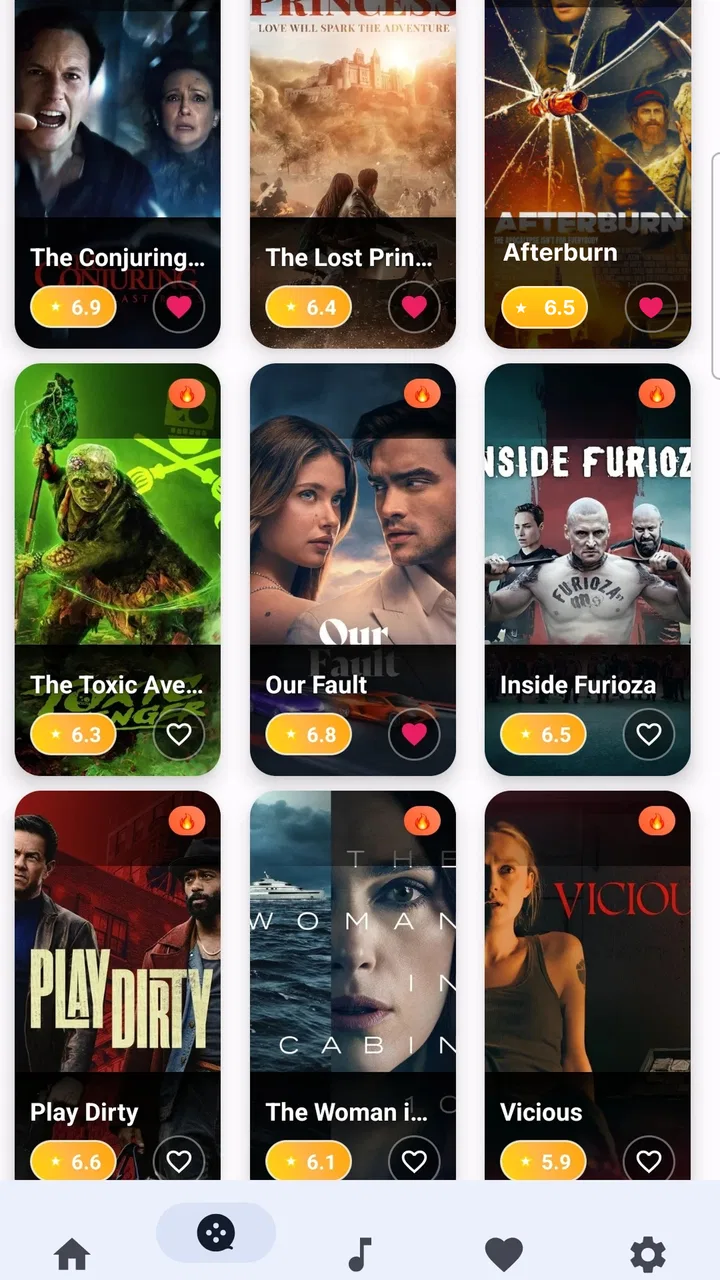
Klede Plus is a versatile streaming app available for Android and iOS, providing access to a wide range of movies and TV shows. It features a user-friendly interface, high-quality streaming options, and supports multiple languages. The app also allows for offline viewing, ensuring entertainment on the go without the need for a constant internet connection.
02Is Klede Plus free to use, and are there any hidden costs?
Klede Plus offers a free version with ads, but a subscription is available for an ad-free experience and additional features. While the app can be used without paying, the premium subscription enhances the viewing experience by removing ads and providing higher-quality streams. Be sure to review the subscription terms before proceeding.
03How does Klede Plus ensure content quality and legality?
Klede Plus collaborates with licensed content providers to ensure high-quality and legal streaming. The app continuously updates its library to include the latest releases while adhering to copyright laws. It's important to download the app from official sources to avoid counterfeit versions that may not comply with legal standards.
04What are the system requirements for installing Klede Plus?
To install Klede Plus, Android users need a device running Android 5.0 or higher, while iOS users require iOS 11.0 or later. The app requires a stable internet connection for streaming and sufficient storage space for offline downloads. It's recommended to use a device with a recent OS version to ensure optimal performance.
05Can I use Klede Plus on multiple devices with a single account?
Yes, Klede Plus supports multi-device use under a single account. This allows users to sync their watchlists and continue watching seamlessly across different devices. However, it's advisable to check the app's terms regarding the number of simultaneous streams allowed to avoid any interruptions.
Pros
- User-friendly interface for easy navigation.
- Wide selection of streaming content.
- High-quality video playback.
- Regular updates with new features.
- Supports multiple devices for convenience.
Cons
- Contains in-app advertisements.
- Limited offline download options.
- Subscription required for full access.
- Occasional buffering issues.
- No parental control features.

Klede Plus
Gallery